Instagram stores
Answer questions about pricing, availability, product features, and purchase conditions. When needed, guide customers to compare options or place an order.
Befroosh Smart Direct
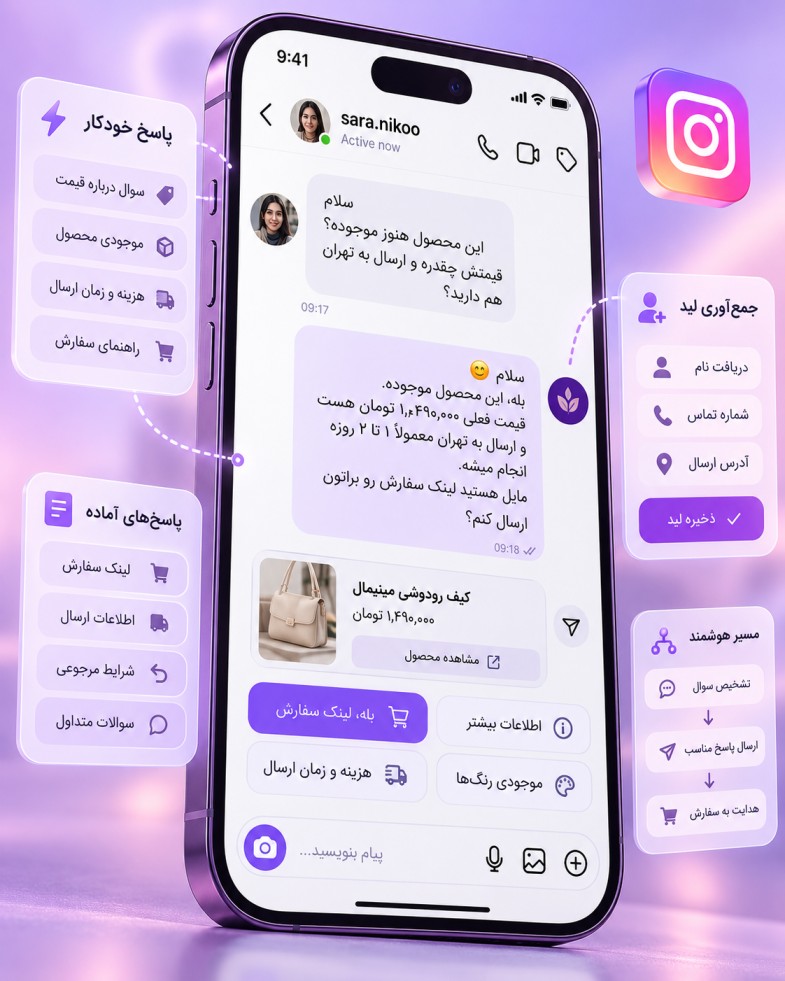
When customers ask about prices, services, or buying in DMs, answering every message should not depend on an account manager being online all the time. With Befroosh Smart Direct, define clear replies for frequent requests and guide people to the next step based on their needs.
From sending a short reply to showing several choices, collecting contact details, or starting an ordering journey, you can use related Befroosh features in DM conversations. Each part has its own settings and capabilities; you do not need to activate them all at once.
Connect with official Meta permissions | Tailor replies to your account
9:41

Befroosh | Smart Direct
Befroosh Automation
Price
Hi, welcome 🌿 To get the price and details, please send the name or code of the product you are interested in.
Price
Send the product name or code to receive its saved pricing information.
Availability
To check availability, please send the name or code of the product you are interested in.
Consultation
You can submit a consultation request for further guidance.
View product

Product 102 · Sample sunscreen
Sample product · Illustrative flow
Actual product prices and information are displayed according to your account settings.
Choose an option to try it
Instagram DM automation
Smart Direct for Instagram automatically responds to private messages using rules and conditions you configure in advance. For example, if someone sends “consultation”, you can set a reply explaining how to request one, and use a different reply for “price”.
This feature is also called an Instagram DM bot, automatic DMs, or DM automation. In Befroosh, “smart” means following predefined replies and paths. It does not mean a bot uses AI to answer every question without configuration.
The first reply is not always the end of the conversation. Some people only need your opening hours, others want to compare models, and some are ready to buy or request a consultation. Smart Direct can start these journeys; use the relevant Befroosh feature for each need.
Option 1
Option 2
Option 3
If someone wants to see several product models or services, display a collection of image cards in DMs instead of sending separate photos. In Showcase Builder, each card’s image, title, description, and buttons are configured manually, and the cards scroll horizontally.
Explore the DM Showcase Builder
Customer request
Choice → relevant reply
Sometimes you need to ask a few questions before giving a final answer, such as identifying the service or option someone wants. With Conversation Flows, design different paths around their choices. The dedicated flows page explains how to build these paths.
Explore Smart Conversation Flows
Information provided by the customer
Name
Phone number
For requests such as consultations or registration, guide people through providing their name, phone number, or other necessary information. This feature records details with their knowledge and helps you follow up; it does not automatically collect information they have not provided.
Explore Lead Capture
Product selection
Continue to the ordering path
Once someone has the information they need and decides to buy, guide them to Automatic Order Registration. This is separate from ordinary replies, and its dedicated page explains the ordering details.
Explore Automatic Order Registration
Imagine you run an educational account and someone writes: “Hi, I’d like to see your courses.”
Step one — automatic reply
“Hi, welcome. Would you like information about beginner courses or advanced courses?”
Step two — the customer’s choice
They select “Beginner”. If the relevant flow has been configured, course information or a collection of course introduction cards can be displayed.
Step three — the next action
If they request a consultation, guide them to the contact-details step. If they only need course information, they receive their answer there.
This is a conceptual conversation example. The step order, button types, and continuation must be configured and tested in the Befroosh panel using a supported flow.
Start Smart Direct for free9:41
Befroosh | Smart Direct
Befroosh Automation
Hi, I’d like to see your courses.
“Hi, welcome. Would you like information about beginner courses or advanced courses?”
Beginner
Course introduction card
Beginner courses
Course information and buttons are displayed according to the account settings.
Request consultation
In the relevant flow, this step can lead to collecting the name and phone number provided by the customer.
Advanced
Course introduction card
Advanced courses
Course information and buttons are displayed according to the account settings.
Request consultation
In the relevant flow, this step can lead to collecting the name and phone number provided by the customer.
Choose a course level
Conceptual example: conversation steps depend on panel settings.
01
Connect your professional Instagram account to Befroosh through Meta with the required permissions. You do not need to give Befroosh your Instagram password directly during this process.
02
Set appropriate replies for common phrases such as “price”, “availability”, “address”, and “consultation”. Clearer requests and replies reduce the chance of an irrelevant message.
03
Use a test account or a controlled real message to check which reply each keyword triggers. Then activate the flow and adjust its wording or path as needed.
Saved replies in Instagram and Meta tools are useful for quickly accessing repeated messages. Some Meta features also offer limited automation for simple messages. If you need separate rules for different requests or a conversation with several defined steps, you need an automation tool with broader capabilities.
The benefit described here is Befroosh’s ability to tailor replies to messages and use related features as the conversation continues. Features covered by other pages do not all need to be explained in this section.
No. With Smart Direct, someone starts a conversation through a private message. With Smart Comments, the interaction starts with their comment under a post or Reel, and a relevant private reply may also be sent. If you want to start conversations from comments, see the Smart Comments page.
Messaging features use an authorized Meta connection and depend on account type, granted permissions, and Instagram rules. Check that you have a professional account and the required access before connecting.
Smart Direct is not designed to send unlimited promotional messages to any user. Automatic messages must be sent within permitted windows and in response to user interaction. If someone does not reply or the conversation falls outside the permitted window, further automatic messaging may be limited.
7 days free
Start with just a few frequent messages from your account. Create a reply for “price” or “consultation”, test it, and explore other paths once you are satisfied with how it works. You do not need every feature on day one.
Befroosh offers a 7-day free trial to evaluate the service. See pricing for the conditions and ongoing subscription costs.
Both terms usually describe tools that automatically respond to private messages. In Befroosh, replies follow configured settings and predefined paths.
Yes. You can configure separate replies for phrases such as “price”, “consultation”, and “address”.
Text replies are the core feature. To display collections of image cards and selectable options, use Showcase Builder and conversation features in supported paths. Other file types should be checked against the panel’s current capabilities.
No. Start with a simple reply. If needed later, expand the conversation path for specific requests.
Yes. With the related Lead Capture feature and the required steps configured, you can ask people to provide the details needed for a consultation or follow-up.
No. Replies and flows must be defined around your account’s needs. Requests outside a configured path may need human attention.
No. Messaging depends on permissions, user-initiated interaction, and Instagram’s messaging limits. Unlimited promotional messaging is not part of this use case.
The connection uses Meta’s authorized process, and you do not need to give Befroosh your account password directly. Check permissions and account requirements before starting.
Befroosh offers a 7-day free trial. See the pricing page for subscription plans and conditions.
Smart Direct helps you provide clear answers to common requests and, when needed, guide customers towards product introductions, information collection, or ordering. Start with a simple flow and expand it around your audience’s actual questions.