

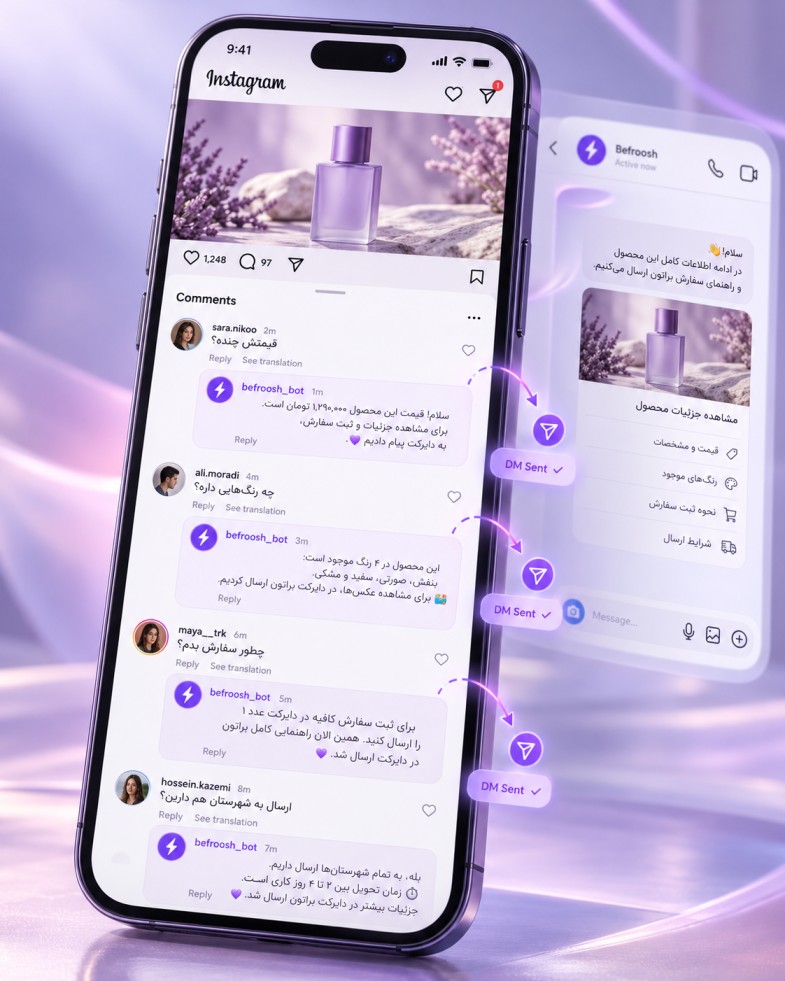
Starting from a comment under a post
This feature starts when the audience comments a specific word or phrase under your post or reel, and the interaction path is activated from there.
The audience comments a word such as “Price”.
Befroosh Smart Comments
With Befroosh Smart Comments, reply to Instagram comments automatically and send users the information they need in Direct. Just set your keywords and preferred replies so repeated questions about price, availability or services get answered faster.
Instead of checking comments one by one, use audience engagement to start conversations and introduce your product.
Start a conversation from a relevant comment.
B
befroosh_demo
Demo page · Sample product
To get the price, comment the word “Price”.
S
sara_demo
Price
B
befroosh_demo
Hi, the product information has been sent to you in Direct.
Comment “Price” → private reply
9:41
Befroosh | Private reply
Befroosh Automation
Private reply to the comment “Price”
Hi! To get the price and details, choose the product you want.
View sample product
Sports shoes · Sample product
The product name, price and link are shown based on your page's settings.
Demo scenario: comment to Direct
is a simulator and is not connected to the real Instagram.
Write the word “Price” under the sample post and submit it to see the public reply and the private message.
Start conversations from the comments section
Instagram Smart Comments is a tool for automatically replying to users' comments under posts. You can specify what reply a user gets when they comment a particular phrase, and what information is sent to them in Direct.
This way, many frequently asked questions are handled without needing a manual reply.
When a post or reel gets a lot of views, you may receive many requests in a short time. Users ask about price, specifications or consultation, and replying manually takes time. An automatic reply can answer specific requests faster and guide the user to Direct to continue the conversation.
Define a ready reply for comments that match your configured rules.
After receiving a relevant comment, send an initial private reply where permitted. To continue the conversation automatically, user interaction and Meta's conditions must be met.
Set a different reply for “Price”, “Availability”, “Consultation” or “Sign-up”.
Adjust the text of the reply under the comment and the private message to match your brand's tone.
It's best to start with a frequent request such as “Price”.
01 · Target content
1. Connect your Instagram professional account to Befroosh with the required permissions.
Sample post selected
02 · Keyword
2. Set the keywords and the text of the public and private replies.
Keyword
Price
Comments related to this word
03 · Replies
3. Test the scenario on a test post, then activate it.
Public reply
Hi, the product information has been sent to you in Direct.
Private message
Hi! To get the price and details, choose the product you want.
Replies about price, availability and buying guidance.
Send course information and sign-up guidance.
Answer initial questions and receive consultation requests.
Send links and related guides.
Introduce services and receive applicants' requests.
A tool for automatically replying to incoming comments and sending information in a private message, under supported conditions.
Connect your page, define keywords and replies, and test the scenario on a post.
Yes, under permitted conditions; sending a private message is subject to Instagram's messaging limits.
Reels support depends on the panel's current features and your account's permissions; check it for your own account.
With keyword scenario support, you can set separate replies for different words.
Yes, sending private messages must follow Instagram's rules and limits.
No; it means replying to the comments received on your own page.
You can try Befroosh free for 7 days and then choose a suitable plan.
7-day free trial
Automate replies to repeated questions and send the right information in Direct.
Start Smart Comments for freeAfter the trial period, you can choose the plan that suits your business.
From an Instagram comment to winning a customer
Send product information
Answer price or specification requests with a suitable message and guide the audience to the product information.
Collect customer information
After the user interacts in Direct, guide them to leave a phone number or request a consultation.
Guide to placing an order
Guide interested users to the automatic order registration flow to complete their purchase.